


How to Enable Google Plus (G+) for Google Apps. Finally!

It always struck me as somewhat of a spectacular own goal that when Google launched Google Plus (G+) in late June 2011, that it wasn’t available for the 4 million businesses coughing up real money for Google Apps, let alone those using them for free.
After the debacle when the big G prematurely launched Buzz to much criticism, this was the opposite end of the spectrum. Lock out the most engaged Google users, and those guaranteed to get the most from a new service. As you’d expect there was a fair bit of forum-based grumbling.
In order to get things working Google needed to roll-out profiles for Google Apps, which was announced matter-of-factly on their blog a couple of days ago. Considering the company’s focus on being more social it’s surprising they haven’t made more of a song and dance about it…yet.
So, if like me, you’d been waiting to get your mitts on this and have a proper look-see without having to constantly login and logout of a personal Gmail account, here’s a quick guide to setting it up (you can find the official Google guide here).
Setting up Google Plus (G+) for Google Apps Administrators
Step 1: Enable Google Profiles for Your Organisation
Login to to your domain’s management console. If you use to access this from the link in the top right-hand corner of your Gmail account, you’ll probably notice the link has disappeared. You can access the control panel directly using a URL.
The format is: http://www.google.com/a/domain.name
Next, select the Organization & users tab from the main menu then choose the Services option.
Scroll down to find the switch for Google+ at the bottom of the list of Google-branded services, see the screenshot below for an example.
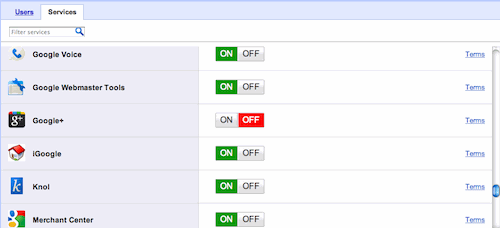
Next up, there’s a warning screen that essentially spells out, that by turning on Google+, you’re letting your organisation’s users control their profiles and get up to all sorts of mischief if they so wish. Probably a good time to check the company’s social media policy.
Note the Turn Google+ on link is the text link, not the button.

Step 2: Individual Users Turn on Google+
So far, so good. Google+ is now turned on at the organisation level, but individual users need to enable their own account so they can use it. Just direct them to the main Google+ homepage at http://plus.google.com.
As long as they are signed in to their Google Apps account, they’ll be prompted to create a profile and get cracking with Google+, it looks like this:

Et voila! Job done, your organisation’s users will get access to all the Google+ goodies including: Profiles, Circles, Streams, Hangouts, Picasa Web Albums and Google+ mobile access.
For admins, Google provides a handy email template to let users know how to enable Google+ and learn more about its features. You’ll find my profile here.
Photo (cc) keso s.
Comments from the original blog
These comments were left on the original WordPress version of this post and are kept for reference. Comments are closed.
Jens Mikkelsen · 19 December 2012
I have tried to add google plus but I can´t find it under the service section where I normal add services.
Do you know if I need a Google Apps premium account to add Google plus ?
Sam Michel (author) · 13 January 2013
@Jens – sorry it’s taken me a while to reply, just checked on a standard (free) Google Apps account and Google+ shows up on the list of services, it’s quite a way down though, so you may have to do a fair bit of scrolling. Hope that helps.
James · 11 February 2014
Hi Sam,
You wouldn’t happen to know how to enable Google+ in the Google Apps administration area using the new layout? I can no longer switch to classic console view and this new layout not as verbose and very confusing. Their help files don’t provide the solution either. Google+ is simply not listed in the apps section..
If you know anything about this your knowledge would be much appreciated.
James
Sam Michel (author) · 11 February 2014
@James – it’s not just you. I had to do some digging but it’s there. Log in to your main Google Apps console, you should see a screen with the main options listed e.g. Users, Company Profile, Biling, etc. At the bottom of the page is a rather subtle more controls button.
Click on that button and you’ll see an option for Other Google Services, you’ll find the Google+ option tucked away in there.
Hope that helps.